
Softube Flow Studio Control Surface

In stock
- Hands-on macro control of complete Softube signal chains
- 5 touch-sensitive Analog Feel knobs with RGB LEDs and 9 buttons
- 4.3″ high-resolution screen for EQ curves, compression and metering
- Includes 25 perpetual Softube plug-ins and 100+ signal chains
- DAW Mode for track volume, pan, sends, solo and mute
- USB-C powered, compact, and sized to match Console 1 Mk III
$799
In stock
-
Control Surfaces, Sales, Studio & Recording
Softube Flow Studio Control Surface
- Hands-on macro control of complete Softube signal chains
- 5 touch-sensitive Analog Feel knobs with RGB LEDs and 9 buttons
- 4.3″ high-resolution screen for EQ curves, compression and metering
- Includes 25 perpetual Softube plug-ins and 100+ signal chains
- DAW Mode for track volume, pan, sends, solo and mute
- USB-C powered, compact, and sized to match Console 1 Mk III
SKU: SFTB_FLOWSTUDIO


The Softube Flow Studio is a compact hardware control surface that gives music producers, songwriters and mix engineers hands-on control of Softube’s Flow signal chains, so you can go from a dry recording to a solid draft mix in a fraction of the time. Instead of opening plug-in after plug-in, you load a ready-made chain for a vocal, guitar, drum bus or master and shape it with five knobs.
It is built for people who want fast, musical results and fewer mouse clicks: busy producers working on many songs, artists mixing their own tracks, and engineers who want a quick, tactile first pass before fine-tuning.
What is a Flow?
A Flow is a professionally built signal chain of Softube plug-ins designed for a specific job, such as a lead vocal, an electric guitar, a bass, a drum bus or a mastering chain. It loads into the Flow Mixing Suite plug-in, which shows the whole chain in one window. Each Flow has macro controls that move several parameters across several plug-ins at once, so a single turn can add warmth, tighten dynamics or open up the top end. More than 100 signal chains are included, and a Designer view lets you build and save your own.
Five knobs, one screen
The top panel has five touch-sensitive, high-resolution Analog Feel potentiometers with RGB LEDs. Four of them control the Flow’s macros, with a Shift button giving access to a second set, and the larger Omni Knob acts as a master control that scales all the macros together. The Omni Knob can also be switched to adjust input gain or output volume. Nine buttons with RGB LEDs, plus Shift for a second layer, handle browsing, loading and navigation.
The 4.3-inch high-resolution screen shows what you are doing: EQ curves, compression, metering and other visualisations, so you can keep your eyes on the controller rather than the computer.
Three working modes
- Flow Mode: browse, load and adjust Flows with the macro knobs.
- Detail Mode: reach individual plug-in parameters, bypass and favourites inside a chain.
- DAW Mode: control the selected track’s volume, pan, sends, solo and mute, with metering on the screen.
25 plug-ins to keep
Flow Studio comes with perpetual licences for 25 Softube plug-ins, so no subscription is needed to use the hardware. They include guitar and bass amps (such as 30W Top Boost, American Mainstayer 100W, Bass Standard Line V8 and Pacific Dual Tremolo), British Class A Drive and Equalizer, FET Compressor Mk II and OPTO Compressor, Core Dimensions reverb, Stereo Delay, Dirty Tape, Tube, Kraft, Clipper, Deesser, Layers, Widener, Model 84 Chorus, Model 72 Envelope Filter, Lion Head, Tinnerö, Bad Speaker, Equalizers and Vocal Tuner. Flows get richer the more Softube plug-ins you own, and an optional Flow subscription unlocks the wider Softube catalogue.
Build and connections
The unit has an anodised aluminium top with injection-moulded sides and back, connects and draws power over USB-C (a 2 m braided USB-C cable is included), and measures 144 x 217 x 42 mm. It has a 100 mm VESA mount underneath and threaded points on the sides, and its footprint matches the Console 1 Channel Mk III and Console 1 Fader Mk III, so the optional Softube stands also fit.
Who is it for?
- Producers and beatmakers who want quick, great-sounding mixes without deep menu diving.
- Artists and songwriters mixing their own music at home.
- Guitarists and bassists who want amp sims and effects under their fingers.
- Mix engineers who like a fast, hands-on first pass before detailed work.
- Console 1 users adding a dedicated macro and Flow controller to their setup.
Not the best fit if: you want to control third-party plug-ins (Flows and the hardware work with Softube plug-ins only), or you prefer to adjust every parameter of every processor individually.
Flow Studio vs Console 1
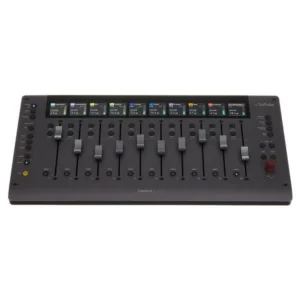
- Console 1 Channel Mk III: a full channel strip controller with 27 Analog Feel knobs, dual screens and one knob per function for detailed, analogue-style mixing. Choose it for precise control of every stage.
- Console 1 Fader Mk III: motorised faders for volume and level-style control across many tracks.
- Flow Studio: the fastest route to a finished sound, using macros over complete chains in a much smaller footprint. It can sit beside Console 1 hardware as part of the same system.
Compare more control surfaces, explore our VST plug-ins, or browse stands to angle it on your desk.
Tips for getting started
- Start with a Flow that matches the source, then sweep the Omni Knob to set how strong the chain is.
- Use the four macros one at a time and listen to what each does before combining them.
- Switch to Detail Mode only when you need a specific parameter, then return to Flow Mode.
- Save your favourite settings as your own Flows to build a personal starting point for each instrument.
Key Features
- Compact hardware control surface for Softube Flow signal chains
- 5 touch-sensitive Analog Feel potentiometers with RGB LEDs, including the Omni Knob
- 9 RGB buttons plus Shift for a second layer
- 4.3″ high-resolution screen with EQ, compression and metering visuals
- Flow, Detail and DAW modes
- 100+ professional signal chains with macro controls
- 25 perpetual Softube plug-ins included
- USB-C connection and power, 2 m braided cable included
- 100 mm VESA mount and side threads
- Sized to match Console 1 Channel Mk III and Fader Mk III
FAQ
Does the Softube Flow Studio control third-party plug-ins?
No. Flows and the Flow Studio hardware work with Softube plug-ins only. Its DAW Mode does give basic track control in your DAW.
Do I need a subscription?
No. Flow Studio includes perpetual licences for 25 Softube plug-ins and over 100 signal chains. An optional subscription adds access to more of the Softube catalogue.
Which DAWs does it work with?
It is listed as compatible with all major DAWs. The Flow plug-in runs inside your DAW, and Softube publishes setup steps for DAW Mode in popular DAWs.
Can I use it with Console 1?
Yes. It shares the same footprint as Console 1 Channel Mk III and Fader Mk III, fits the same stands, and can be used alongside them.
Does it need a power supply?
No. It is powered over the included USB-C cable.
| Weight | 2.2 kg |
|---|---|
| Dimensions | 35 × 25 × 10 cm |
| brands | Softube |
Specifications
| Specification | Details |
|---|---|
| Type | Hardware/software control surface for Softube Flow |
| Knobs | 5 touch-sensitive high-resolution Analog Feel potentiometers with RGB LEDs (incl. Omni Knob) |
| Buttons | 9 with RGB LEDs, plus Shift layer |
| Screen | 4.3″ high-resolution display |
| Modes | Flow, Detail, DAW |
| DAW control | Volume, pan, sends, solo, mute |
| Included software | Flow Mixing Suite plug-in, 25 perpetual Softube plug-ins, 100+ signal chains |
| Connection and power | USB-C |
| Included cable | 2 m USB-C to USB-C braided |
| Mounting | 100 mm M4 VESA (bottom), M4 threads (sides) |
| Construction | Anodised aluminium top, injection-moulded sides and back |
| Dimensions | 144 x 217 x 42 mm (W x D x H) |
| Compatibility | Matches Console 1 Channel Mk III and Console 1 Fader Mk III footprint |
Related products
-
Control Surfaces, Studio & Recording
Softube Console 1 Fader Mk III – Motorised Fader Control Surface
 Control Surfaces, Studio & Recording
Softube Console 1 Fader Mk III – Motorised Fader Control Surface
- Ten motorised 100 mm Analog Feel faders with capacitive touch
- Haptic feedback you can feel at unity gain, pan centre and on clipping
- Ten high-resolution screens show track name, colour, level and pan
- Console 1, Pro Tools HUI, MCU and UAD Apollo Central modes
- Dual USB-C: chain up to four Faders plus a Channel Mk III, no hub
- Includes the Console 1 Core Mixing Suite software
SKU: SFTB_CONSOLE1FADERMKIII -