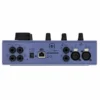
DiGiGrid D Desktop 4×6 SoundGrid Audio Interface

- 4 inputs and 6 outputs at up to 96 kHz over a single Ethernet cable
- Two mic preamps with up to 70 dB of gain, phantom power and high-pass filter
- Two instrument/line inputs for guitar, bass and keys
- Analogue monitor and headphone level controls with Dim, Mute and Mono
- Powered by the included 12 V supply or Power over Ethernet
- Share one interface between several computers on a SoundGrid network
$1,709
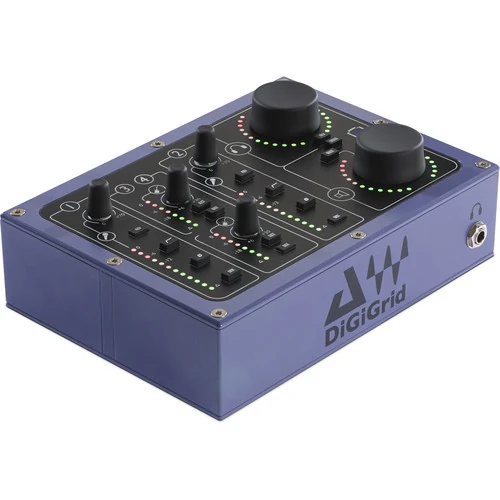
The DiGiGrid D is a compact four-input, six-output desktop audio interface that connects to your Mac or PC over Ethernet using Waves SoundGrid instead of USB or Thunderbolt. It is built for Waves and SoundGrid users who want DiGiCo-designed preamps on the desk, and for studios, schools and live rigs that want an interface they can grow into a larger networked system.
Network Audio Instead of USB
A single Cat 5e or Cat 6 cable carries audio and clock between the D and your computer. Because SoundGrid is a network, the same D can be reached from more than one computer at once, so a recording machine and a virtual instrument machine can both use it, or audio can pass between two DAWs. As your setup grows, you can add more DiGiGrid I/O, a SoundGrid DSP server for low-latency plugin processing, or a DiGiGrid S switch, which networks up to four DiGiGrid units up to 75 metres apart and powers them over Ethernet.
Routing is handled in the SoundGrid Studio application, installed through Waves Central, where every input and output can be assigned independently. The D works as a standard audio device with your existing DAW, such as Pro Tools, Logic, Cubase, Nuendo or Ableton Live.
Two Serious Mic Preamps
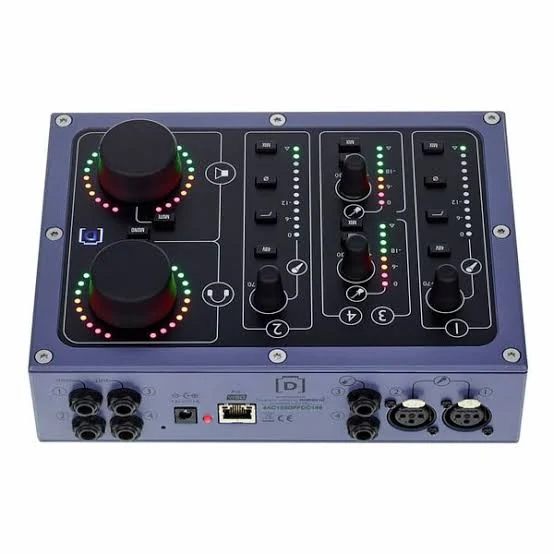
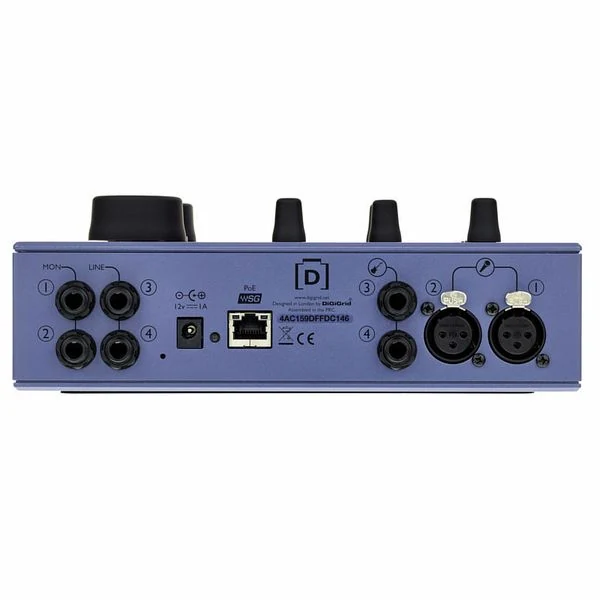
Inputs 1 and 2 are mic/line XLR inputs with up to 70 dB of gain, enough for quiet sources and low-output dynamic or ribbon microphones as well as condensers. Each has its own phantom power, polarity invert and an 18 dB per octave high-pass filter at 100 Hz, plus a 12-segment LED meter. Inputs 3 and 4 are 1/4″ TRS line inputs with an INST switch for direct guitar, bass or keyboard recording, each with up to 30 dB of gain and its own meter.
Monitoring Built for the Desk
Outputs 1 and 2 are level-controlled monitor outputs for studio speakers, and outputs 3 and 4 are fixed-level line outputs on the rear for a second speaker pair, an effects send or a headphone amp. A high-power headphone output on the front has its own level control, so headphone and speaker levels are set separately.
Each input has a MIX button that sends it straight to the monitor and headphone outputs, so you can hear yourself with no computer delay while tracking. A Dim button drops the monitor and headphone level by 20 dB, Mute silences the speakers only, and a Mono button checks your mix in mono. LED rings around the monitor and headphone knobs show their levels.
Power and Build
The D runs from the included twist-lock 12 V DC power supply, or from Power over Ethernet when connected to a DiGiGrid S switch, which removes the need for a separate power point. The metal case weighs 1.7 kg and measures 220.5 x 160 x 78.5 mm, so it stays put on the desk.
What You Need
- A Mac or PC with a wired Ethernet port, or a suitable Ethernet adaptor
- SoundGrid Studio and the DiGiGrid D driver, downloaded through Waves Central (check the Waves website for current operating system and DAW compatibility)
- A Cat 5e or Cat 6 Ethernet cable
Who Is It For?
- Waves and SoundGrid users who want a desktop interface that plugs into their existing network and servers.
- Producers starting with SoundGrid who plan to add a DSP server later for low-latency plugins while tracking.
- Studios with more than one computer that want to share one interface between machines.
- Schools and teaching spaces that need several networked interfaces managed from one place.
It is not the simplest choice if you only want a plug-and-play interface for one computer and have no plans to use SoundGrid; a USB interface with similar inputs will cost less.
DiGiGrid D vs Other DiGiGrid Interfaces
The D is the largest model in the DiGiGrid desktop range. The DiGiGrid M and Q share its design: M has two inputs instead of four, and Q adds extra headphone outputs to a SoundGrid system. For a larger studio or live rig, the rackmount DiGiGrid IOX offers 12 mic/line inputs, 6 line outputs and four headphone outputs in a 1U case. See all audio interfaces, or add a pair of active studio monitors to the D’s monitor outputs.
Key Features
- 4-in, 6-out desktop interface at up to 96 kHz
- Two mic/line preamps with up to 70 dB of gain
- Phantom power, polarity invert and 100 Hz high-pass filter on each mic input
- Two 1/4″ TRS line inputs with instrument (Hi-Z) switch
- Level-controlled monitor outputs plus two fixed line outputs
- High-power headphone output with its own level control
- Direct MIX buttons for zero-latency monitoring
- Dim, speaker Mute and Mono buttons
- Single-cable SoundGrid Ethernet connection, shareable between computers
- 12 V twist-lock power supply included, or Power over Ethernet
Frequently Asked Questions
Does the DiGiGrid D work without a SoundGrid server?
Yes. It works as a standalone audio interface with your DAW over one Ethernet cable. A SoundGrid server is optional and adds low-latency plugin processing.
Can I use it with Pro Tools, Logic or Ableton?
Yes. It appears as a standard audio device to native DAWs such as Pro Tools, Logic, Cubase, Nuendo and Ableton Live.
Does it need a separate power supply?
A 12 V twist-lock power supply is included. When connected to a DiGiGrid S switch, it is powered over Ethernet and needs no external supply.
Can more than one computer use it at the same time?
Yes. Because it sits on a SoundGrid network, the D can be accessed by several computers and DAWs at once, with the software installed on each.
How do I monitor without latency?
Press the MIX button on an input to send it directly to the monitor and headphone outputs, before the computer.
Can I add more inputs later?
Yes. One host can access up to eight SoundGrid I/O devices, so you can add other DiGiGrid interfaces to the same network.
| Weight | 2.72 kg |
|---|---|
| Dimensions | 5 × 15 × 10 cm |
| brands | Digigrid |
Specifications
| Specification | Details |
|---|---|
| Inputs | 4 (2 mic/line XLR, 2 line/instrument 1/4″ TRS) |
| Outputs | 6 (2 level-controlled monitor, 2 fixed line, stereo headphone) |
| Sample Rate | Up to 96 kHz |
| Mic Preamp Gain | 0 to +70 dB |
| Line/Instrument Input Gain | Up to 30 dB |
| High-Pass Filter | 100 Hz, 18 dB/octave |
| Phantom Power | +48V, switchable per mic input |
| Mic Input THD | 0.005% |
| Monitor Output Max Level | +22 dBu |
| Monitor Output Impedance | 50 Ω |
| Headphone Max Output | 8.8 V RMS into 600 Ω, 3.7 V RMS into 32 Ω |
| Monitoring | Direct MIX per input, Dim (−20 dB), Mute, Mono |
| Connection | SoundGrid Ethernet (Cat 5e / Cat 6) |
| Power | 12 V DC twist-lock supply (included) or Power over Ethernet |
| Dimensions (W x D x H) | 220.5 x 160 x 78.5 mm |
| Weight | 1.7 kg |
Related products
-
Audio Interfaces
ESI MAYA44 eX 24-bit/96kHz PCIe Audio Interface with 4 in / 4 out
- Two Stereo 1/4″ Inputs and Outputs
- Resolutions up to 24-Bit/96 kHz
- Microphone Input with +48V Phantom Power
- Hi-Z Guitar Input
- Headphone Output
- Optical S/PDIF Input and Output
- Bundled with a Deckadance LE License
- Includes inTone 2 ESI Edition Software
- Plug-Ins: ampLion Free and GK Amp 2 LE
- Mac and Windows Compatible
SKU: ESIA_MAYA44EX -
Audio Interfaces, MIDI Controllers
IK iRig Stomp I/O – Rugged USB Pedal Board Controller/Audio Interface for iOS, Mac/PC
 Audio Interfaces, MIDI Controllers
IK iRig Stomp I/O – Rugged USB Pedal Board Controller/Audio Interface for iOS, Mac/PC
- For Live & Studio Use
- MFi-Certified Audio Interface
- Stompbox Form Factor
- 4 Footswitches & Expression Pedal
- MIDI I/O & Jacks for Additional Switches
- 96 kHz / 24-Bit Signal Path
- Class A Preamp
- Neutrik Combination XLR-1/4″ Input Jack
- 1/4″ Floating Balanced Stereo Outputs
- Includes Processing Software & DAW
SKU: IKMT_IP-IRIG-STOMPIO