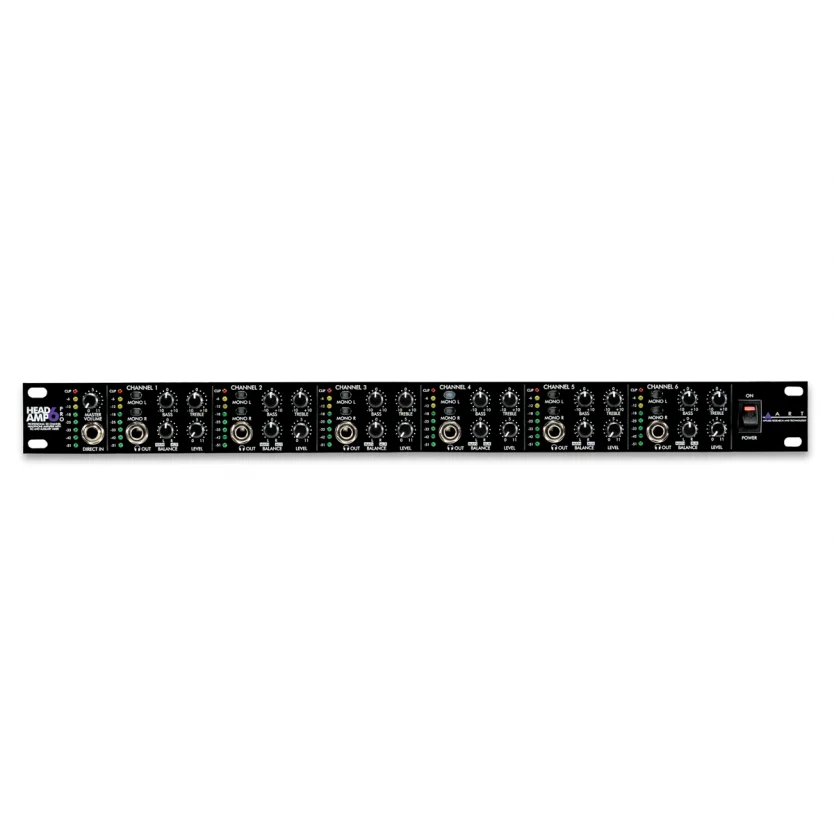
ART HeadAmp6 Pro Professional Six Channel Headphone Amplifier

Out of stock
- Six stereo channels, up to 12 pairs of headphones
- Aux input on every channel for personal “More Me” mixes
- Bass and treble EQ plus mono switching per channel
- 500 mW per channel into 32 Ω headphones
- Balanced XLR/TRS inputs with Thru for chaining units
- Compact 1U rackmount chassis
 ART HeadAmp6 Pro Professional Six Channel Headphone AmplifierOut of stock
 ART HeadAmp6 Six Channel Stereo Headphone Amplifier
$559
Out of stock
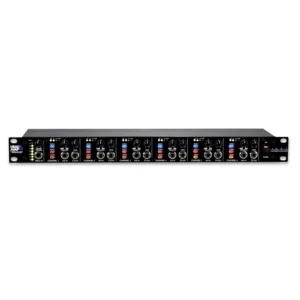
The ART HeadAmp6 Pro is a six-channel stereo headphone amplifier in a single rack space, built for recording studios, rehearsal rooms, churches, schools and live tracking sessions where several musicians need to hear themselves at once. Each of the six channels has its own level, bass and treble, mono switching and an auxiliary input, so every player can dial in a personal “more me” mix without touching the main console send.
Six independent headphone mixes from one rack unit
Feed the HeadAmp6 Pro a stereo mix from your mixer or audio interface through the balanced XLR or 1/4″ TRS main inputs on the rear, and that signal is distributed to all six channels. Each channel has a stereo 1/4″ headphone output on the front and a second one on the rear, wired in parallel, so you can connect up to 12 pairs of headphones. The rear output can also feed another headphone amp if you need even more listening stations.
A Master Volume control sets the level of the main bus, with an 8-segment LED meter and a red clip LED. Every channel also has its own Level control and 8-segment meter, so you can see at a glance which musician is getting what.
Per-channel “More Me” aux inputs
The feature that sets the HeadAmp6 Pro apart from a basic headphone splitter is the stereo aux input on the rear of every channel. Plug a separate signal into a channel’s aux jack, such as an aux send from your console carrying just the singer’s vocal, a click track or a keyboard, and that channel’s Balance control changes from left/right panning to a blend between the main mix and the aux signal. The aux signal is heard only on that channel, so the drummer can turn up the click while the vocalist hears more of their own voice.
One practical tip from the manual: the aux signal and the same source in the main mix need to be in phase. If they are out of phase, turning up the aux will make that instrument quieter rather than louder. Most consoles have a phase invert switch that fixes this in seconds.
Tone and mono controls on every channel
Each channel has shelving bass (100 Hz) and treble (10 kHz) controls with ±12 dB of range, so a bass player can add low end and a singer can brighten their mix without changing anyone else’s. Mono L and Mono R switches let you choose stereo, left only, right only or both summed to mono. That is useful when a musician only wants a mono feed, or when you send a click on one side and the band on the other.
Daisy-chain for larger setups
Balanced Main Thru connectors on the rear are wired in parallel with the main inputs, so you can chain several units from the same mix for larger ensembles, choirs or classrooms. A front-panel 1/4″ Direct In overrides the rear inputs, which is handy for quickly plugging in a phone, keyboard or playback device; note that the Direct In does not pass through to chained units.
Setup tips for a clean headphone feed
- Gain staging: start with every control turned down and the tone controls at 12 o’clock. Raise Master Volume until the green and yellow LEDs light on peaks without the red clip LED, then set each channel’s Level. A strong main signal with modest channel levels gives the lowest noise.
- Use balanced cables into the rear main inputs wherever possible to avoid hum and noise.
- Mono sources on the aux input: use the channel’s Mono buttons, or tie tip and ring together on the plug, so the signal reaches both ears.
- Two headphones per channel: paralleled headphones share the channel’s power. If you hear clipping at high volume with several pairs connected, spread them across more channels.
Who is the ART HeadAmp6 Pro for?
- Recording studios tracking full bands where each player needs a different balance.
- Rehearsal rooms and home studios running a quiet, in-ear or headphone-based setup.
- Churches and worship teams giving singers and musicians their own monitor mix.
- Schools, language labs and podcast rooms that need up to 12 people listening from one source.
If you only need one or two headphone feeds next to your desk, a simple desktop headphone amplifier or the headphone output on your audio interface is usually enough.
HeadAmp6 Pro vs ART HeadAmp6
ART also makes the standard HeadAmp6, and both are six-channel, 1U rack headphone amps with per-channel aux inputs. The Pro adds bass and treble controls and an individual level meter on every channel, with two headphone outputs per channel (12 pairs). The standard HeadAmp6 has three outputs per channel (up to 18 pairs) but no per-channel EQ. Choose the Pro if each musician needs to shape their own tone; choose the standard model if your priority is connecting the most headphones. Pair either one with good studio headphones for the best result.
Key Features
- Six stereo headphone channels in a 1U 19″ rack chassis
- Two 1/4″ outputs per channel (front and rear): up to 12 headphones
- Stereo aux input on every channel for personal “More Me” mixes
- Per-channel Level, Balance, Bass and Treble (±12 dB) controls
- Mono L and Mono R switches on each channel
- 8-segment LED meters on the main bus and every channel
- Balanced XLR and 1/4″ TRS main inputs with Main Thru for chaining
- Front-panel 1/4″ Direct In
- 500 mW per channel into 32 Ω headphones
- Internal power supply in a steel and aluminium chassis
Frequently Asked Questions
How many headphones can the ART HeadAmp6 Pro run?
Up to 12 pairs: each of the six channels has a front and a rear 1/4″ headphone output. You can chain more units through the Main Thru outputs for bigger setups.
Can each musician have a different mix?
Yes. Each channel has its own aux input, and the Balance control blends that aux signal with the main mix, so each person can hear more of a specific instrument, vocal or click.
What headphones work best with it?
It is optimised for headphones between 32 and 600 ohms, delivering 500 mW into 32 ohms and 150 mW into 600 ohms. ART does not recommend headphones below 16 ohms.
Can I connect it to my audio interface?
Yes. Connect your interface’s line outputs to the balanced main inputs using TRS or XLR cables. If your interface has extra outputs, you can also send a separate stereo mix into one or more channel aux inputs.
Does it need an external power adapter?
No. The HeadAmp6 Pro has an internal power supply and plugs straight into mains power, with a power switch on the rear panel.
Can I chain two HeadAmp6 Pro units together?
Yes, using the balanced Main Thru connectors on the rear. Note that the front Direct In does not pass through to chained units.
| Weight | 3.69 kg |
|---|---|
| Dimensions | 53 × 26 × 8.6 cm |
| brands | Art Pro Audio |
Specifications
| Specification | Details |
|---|---|
| Channels | 6 stereo headphone channels |
| Headphone outputs | 12 x 1/4″ TRS (front and rear per channel, in parallel) |
| Main inputs | Balanced XLR and 1/4″ TRS, line level |
| Main Thru | Balanced XLR and 1/4″ TRS (parallel) |
| Direct input | 1/4″ TRS front panel, overrides rear inputs |
| Aux inputs | 6 x stereo 1/4″ TRS, one per channel |
| Max output power | 500 mW @ 32 Ω, 150 mW @ 600 Ω, 150 mW @ 8 Ω (1 kHz) |
| Recommended headphone impedance | 32–600 Ω (not below 16 Ω) |
| Output impedance | ≤ 12 Ω |
| Frequency response | 20 Hz – 50 kHz, +0/-2 dB |
| Tone controls | Bass ±12 dB @ 100 Hz, Treble ±12 dB @ 10 kHz (shelving) |
| Max gain | 25.6 dB @ 1 kHz |
| Max input level | +21.5 dBu |
| Input impedance | 40 kΩ balanced main, 9.9 kΩ Direct In |
| Dynamic range | ≥ 101 dB (typical) |
| CMRR | ≥ 40 dB @ 1 kHz |
| Metering | 8-segment LED on main bus and each channel |
| Power | Internal supply, 60 W max, 18 W idle |
| Rack size | 1U, 19″ |
| Dimensions (H x W x D) | 44.5 x 482.6 x 190.5 mm |
| Weight | 3.1 kg |
Related products
-
Headphone Amplifiers, Headphones
ART HeadAmp6 Six Channel Stereo Headphone Amplifier
- Six stereo channels, up to 18 pairs of headphones
- Front aux input on every channel for “More Me” mixes
- Mono and mute L/R switching per channel
- 500 mW per channel into 32 Ω headphones
- Balanced XLR/TRS inputs with Thru for chaining
- Compact 1U rackmount chassis
SKU: ARTP_HEADAMP6CE -
DI Boxes
ART Dual ZDirect Two-Channel Passive DI Box
- Two independent passive DI channels with isolation transformers
- Switchable 0, -20 and -40 dB pad on each channel
- Ground lift, phase invert and 30 kHz low-pass filter per channel
- Thru jacks to feed amps or tuners
- No batteries or phantom power required
- Compact black anodised aluminium case
SKU: ARTP_DUALZDIRECT -
Headphone Amplifiers, Weekly Deals
ART HeadAMP 4 Pro Headphone Amplifier with Talkback
- Multi-channel stereo headphone amplifier, independent volume per output
- Up to 150 mW per channel for loud, clean cue mixes
- Built-in talkback: XLR mic input with phantom power, footswitchable
- Talk to one performer or all of them
- Separate aux inputs for personal “more me” mixes
- Balanced main inputs, wide 10 Hz to 40 kHz response
SKU: ARTP_HEADAMP4PROCE -