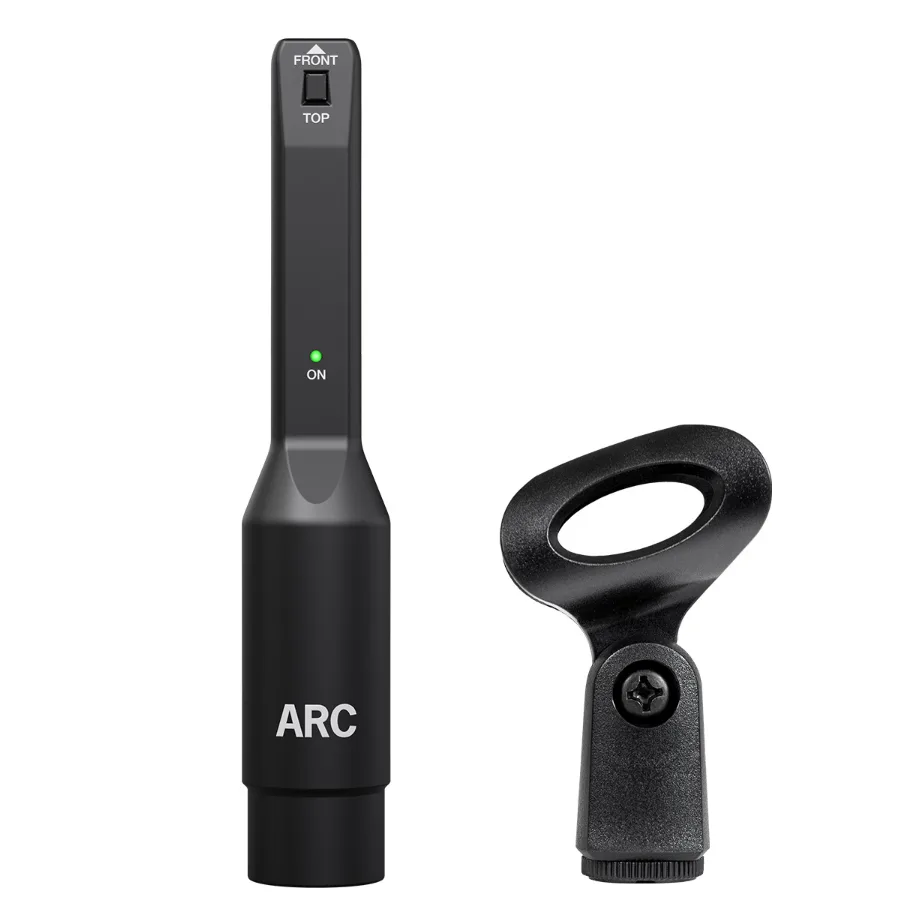
IK Multimedia ARC Measurement Mic (MEMS)
In stock
- Official IK MEMS measurement mic for ARC room correction
- Calibrated response of 20 Hz to 20 kHz, ±0.5 dB with ARC
- Works with ARC 2.5 and later, ARC Studio and iLoud monitors
- MEMS capsule stays stable over time and matches unit to unit
- Light 25 g body with mic clamp included
- Microphone only: ARC software is not included
$179
In stock
The IK Multimedia ARC Measurement Mic is the official MEMS reference microphone for IK’s ARC room correction system. It is meant for ARC users who need a replacement or a second mic, iLoud monitor owners whose speakers did not come with one, and ARC Studio users who want a dedicated mic for each room. It is a measurement tool, so your monitors and correction curve depend on it being accurate.
One thing to know before you buy: this is the microphone only. It does not include an ARC software licence. If you are starting from scratch, you need ARC software or an ARC-enabled IK product as well.
Why a MEMS measurement mic?
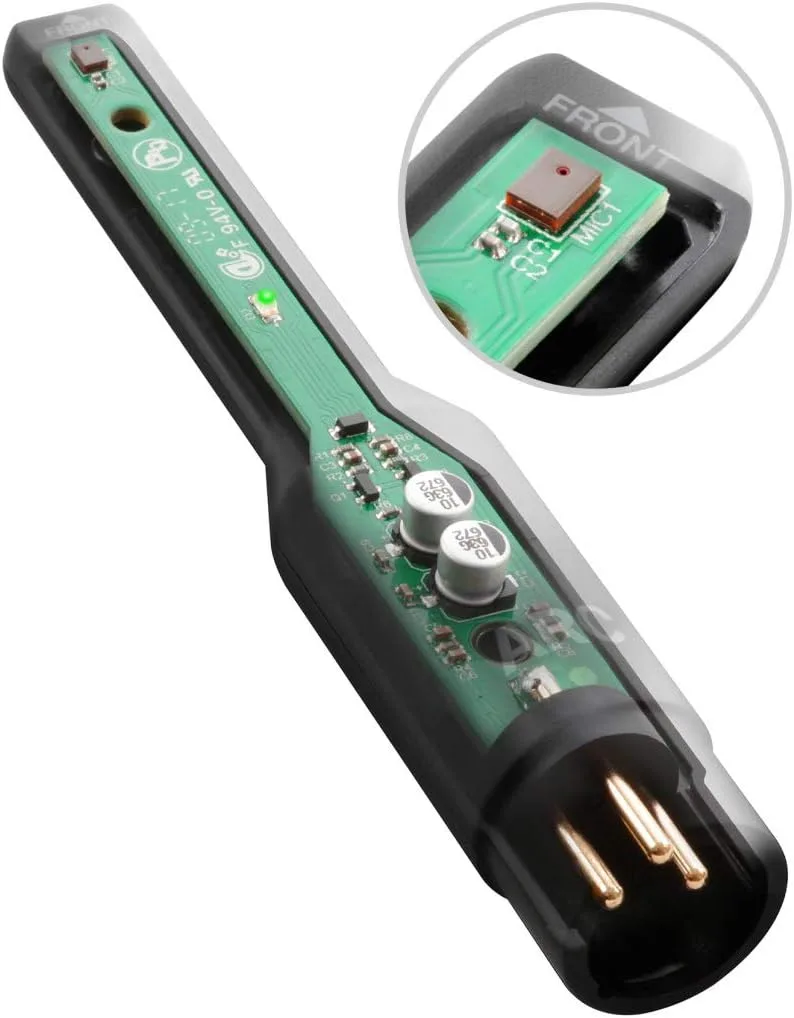
Most budget measurement mics use small electret capsules. Their response can drift with age, humidity and temperature, and two units of the same model can measure differently. IK uses a MEMS capsule instead, which is a microphone built with chip-style manufacturing. MEMS capsules come off the line with almost no unit-to-unit variation, and their response stays stable over time. In practice this means a measurement you take today should match one you take in two years, and a replacement mic should behave like the one it replaces.
When used with ARC, the mic is calibrated to ±0.5 dB from 20 Hz to 20 kHz. That tolerance is tight enough that the correction curve ARC builds reflects your room, not the mic.
What it works with
The ARC Measurement Mic is compatible with:
- ARC software version 2.5 and later, including the current ARC X plug-in
- ARC Studio hardware room-correction processor
- iLoud Precision (MKI and MKII)
- iLoud Micro Monitor Pro
- iLoud MTM and iLoud MTM MKII
For software-based ARC, plug the mic into a phantom-powered XLR input on your audio interface. ARC X measures at 44.1 kHz or 48 kHz, so set your interface to one of those rates for the measurement. For self-calibrating iLoud monitors, connect the mic to the monitor’s own mic input and run calibration from the speaker.
Cables: check this before you order
The box contains the mic and a clamp, not a cable. Into an audio interface or ARC Studio, a standard XLR mic cable is all you need. iLoud monitors such as the MTM MKII use a 3.5 mm (1/8″) mic input, so you need an XLR female to 3.5 mm TS cable. Pairs of these monitors often ship with that cable, but if you are buying the mic separately, make sure you have one.
Who is it for?
- ARC owners who have lost, damaged or misplaced the original mic
- iLoud buyers who bought a single monitor or a package without the mic and want to run the built-in calibration
- Engineers with several rooms who want a mic kept in each studio or travel kit
- Owners of older ARC mics moving to the MEMS version for more consistent results
Who it is not for: anyone looking for a complete room-correction system for third-party speakers. In that case, buy an ARC X bundle that includes both the software and the mic.
ARC Measurement Mic vs miniDSP UMIK-1
The miniDSP UMIK-1 is the best-known alternative. It is a USB microphone with its own built-in converter and an individual calibration file, rated at ±1 dB. That makes it convenient for Room EQ Wizard or Dirac on a laptop with no interface. The ARC mic takes a different approach. It is an analogue, electronically balanced mic that needs 12–48 V phantom power, and it is calibrated to ±0.5 dB when used with ARC. Most importantly, a USB mic cannot plug into the mic input of an iLoud monitor or an ARC Studio unit. If your system relies on IK’s hardware calibration, the ARC mic is the one to get.
Measurement tips
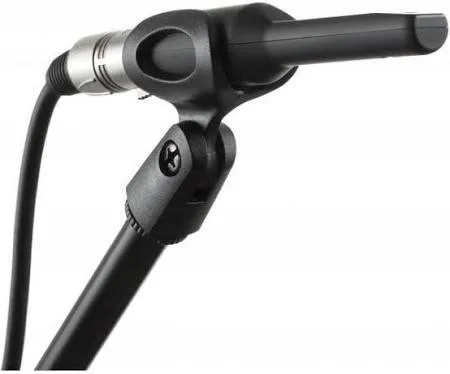
- Mount the mic in the supplied clamp on a stand at ear height, and orient it using the FRONT / TOP marking on the body as ARC’s on-screen guide shows
- Keep the room quiet during the sweeps and move yourself out of the way between points
- Follow ARC’s measurement grid around your listening position rather than measuring one spot
- Re-measure after you move monitors, furniture or acoustic treatment
Key Features
- Omnidirectional, free-field MEMS measurement microphone
- Calibrated response of 20 Hz – 20 kHz, ±0.5 dB with ARC
- Transformerless, electronically balanced output, 100 Ω impedance
- Handles up to 124 dB SPL
- Runs on 12–48 V phantom power
- Compact 129.5 x 23 mm body weighing only 25 g
- Microphone clamp included
- Green ON indicator LED and FRONT / TOP orientation marking
FAQ
Does the IK Multimedia ARC Measurement Mic include ARC software?
No. It is sold as a mic only, with a clamp. You need an existing ARC licence, ARC Studio, or a self-calibrating iLoud monitor to use it for room correction.
Will it work with my older ARC version?
It is supported from ARC 2.5 onward, which includes ARC 3, ARC 4 and ARC X. If you are on an earlier version, you need to update your ARC software first.
Which cable do I need for iLoud MTM MKII?
The MTM MKII has a 3.5 mm mic input, so you need an XLR female to 3.5 mm TS cable. For an audio interface or ARC Studio, use a standard XLR mic cable.
Can I use it with other measurement software?
It is a standard balanced XLR mic, so other software can record it through your interface. However, the ±0.5 dB calibration figure applies when it is used with ARC.
Can I record with it?
Yes. It is a flat, omnidirectional mic, so it can also capture room ambience or serve as a reference recording mic. It is not designed as a vocal mic, though. For recording, see our condenser microphones.
Do I still need acoustic treatment?
Room correction evens out frequency response at your listening position. It cannot remove long reflections or reverb the way physical treatment can. The two work best together. Browse active studio monitors if you are planning a full ARC-based setup.
| Weight | 0.2 kg |
|---|---|
| Dimensions | 17 × 16 × 6 cm |
Specifications
| Specification | Details |
|---|---|
| Type | MEMS condenser measurement microphone |
| Polar pattern | Omnidirectional |
| Design | Free field |
| Calibrated frequency response | 20 Hz – 20 kHz, ±0.5 dB (with ARC) |
| Output | Transformerless, electronically balanced |
| Connector | XLR |
| Impedance | 100 Ω |
| Signal-to-noise ratio | 65 dB (A-weighted) |
| Maximum SPL | 124 dB SPL |
| Phantom power | 12–48 V |
| Dimensions | 129.5 x 23 mm |
| Weight | 25 g |
| Included | Measurement microphone, microphone clamp |
| Cable | Not included |
| Software | Not included |
| Compatibility | ARC 2.5 and later (incl. ARC X), ARC Studio, iLoud Precision MKI/MKII, iLoud Micro Monitor Pro, iLoud MTM, iLoud MTM MKII |