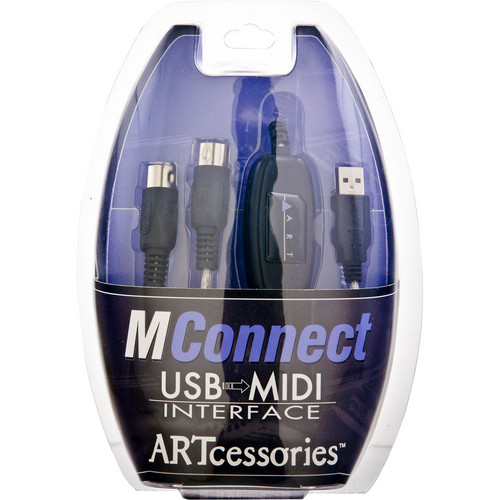
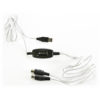
ART MConnect USB to MIDI Cable
In stock
- Connects any 5-pin MIDI device to a computer’s USB port
- 16 MIDI channels in and 16 out
- Plug and play on Windows and Mac, drivers install automatically
- LEDs for power, MIDI In and MIDI Out make troubleshooting easy
- Labelled moulded plugs so you connect the right end every time
- 2 m length, light enough for a laptop bag
$69
In stock
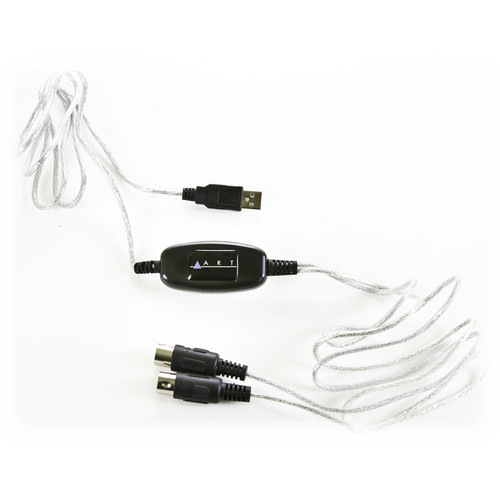
The ART MConnect is a USB to MIDI cable that connects any keyboard, synthesiser, drum machine, controller or sound module with 5-pin MIDI sockets to a computer’s USB port. It is for home-studio producers, keyboard players and anyone with older MIDI gear who wants to record or play it through a DAW without buying a full audio interface.
What the ART MConnect does
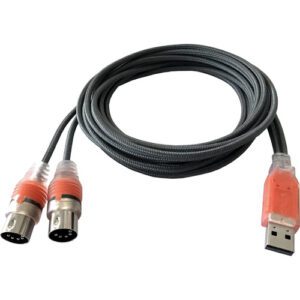
Plenty of excellent instruments predate USB, and many current synths still use traditional 5-pin DIN MIDI. The MConnect bridges the two: one end plugs into a USB-A port on your computer, and the other splits into separate MIDI In and MIDI Out plugs. Your DAW then sees it as a MIDI port, so you can record what you play, or send notes and controller data back to the instrument from your software.
Plug and play on Windows and Mac
There is no driver disc or setup software. The first time you plug the MConnect into a Windows or Mac computer, the operating system installs what it needs automatically. After that, it works with any software that supports USB MIDI devices, including DAWs, notation programs and synth editors.
16 channels each way
The MConnect carries a full MIDI connection: 16 channels in and 16 channels out. That is enough to record a keyboard and, at the same time, play back a multi-part arrangement through a multitimbral sound module on separate channels.
Connect it the right way round
The most common MIDI cable mistake is plugging In to In. MIDI always runs from an output to an input, so:
- The plug that carries data into the computer goes to the instrument’s MIDI Out socket.
- The plug that carries data out of the computer goes to the instrument’s MIDI In socket.
The MConnect’s moulded plugs are labelled with their function to make this easier. If you only want to play a keyboard into your DAW, you only need the one plug connected to the keyboard’s MIDI Out.
LEDs that make troubleshooting quick
Three indicator LEDs show power, incoming MIDI and outgoing MIDI. If you press a key and the MIDI In LED flashes but your software hears nothing, the cable is working and the problem is in your DAW’s MIDI input settings. If the LED does not flash at all, check that the plug is in the instrument’s MIDI Out and that the instrument is sending on the expected channel.
Who is it for?
- Good fit: owners of vintage or 5-pin-only synths, digital pianos and drum machines who want to connect them to a laptop or desktop.
- Good fit: a simple, portable MIDI link for a gigging keyboard player.
- Not needed: if your keyboard or controller already has a USB port that sends MIDI, a standard USB cable does the job.
- Not the best fit: large setups that need several MIDI ports, MIDI Thru or merging. A multi-port MIDI interface suits those better.
MIDI cable vs MIDI interface box
A cable-style interface like the MConnect gives you one MIDI In and one MIDI Out with nothing extra to carry or mount. A box-style MIDI interface typically adds more ports and sometimes Thru or routing, at a higher price and with more to set up. For connecting one instrument to one computer, the cable is the simpler choice. Compare options in our MIDI interfaces range, or find a controller to pair it with among our MIDI keyboards.
Key Features
- USB-A to 5-pin DIN MIDI In and MIDI Out
- 16 MIDI channels in, 16 out
- Plug and play on Windows and Mac, automatic driver installation
- LED indicators for power, MIDI In and MIDI Out
- Labelled, moulded connector ends
- Works with any software that supports USB MIDI
- 2 m (6.5 ft) cable, 140 g
Why buy from 10dB
Orders leave the 10dB warehouse the same day as your purchase and travel by Australia Post, usually arriving within 3–5 days. See more gear for your setup in our synthesizers section.
FAQ
Do I need drivers for the ART MConnect?
No separate driver download is needed. Windows and macOS install what they need automatically the first time you connect it.
Which plug goes into my keyboard’s MIDI Out?
The plug that sends data into the computer. Out always connects to In, and the moulded plugs on the MConnect are labelled to help.
Can I use it with any DAW?
It works with software that supports USB MIDI devices, which covers mainstream DAWs, notation software and synth editors.
Does it carry audio?
No. MIDI is note and control data only. To record the sound of your synth you also need an audio interface.
My keyboard has USB. Do I need this cable?
Only if you want to use its 5-pin MIDI sockets. If its USB port sends MIDI, a standard USB cable is enough.
How long is the cable?
2 m (6.5 ft), which reaches comfortably from a desk to a keyboard stand.
| Weight | 0.1383456728 kg |
|---|---|
| Dimensions | 20.828 × 13.335 × 5.334 cm |
Specifications
| Specification | Details |
|---|---|
| Type | USB to MIDI cable interface |
| Connectors | 1 x USB-A, 2 x 5-pin DIN MIDI (In and Out) |
| MIDI channels | 16 in, 16 out |
| Indicators | Power, MIDI In, MIDI Out LEDs |
| Drivers | Install automatically on first connection |
| Compatibility | Windows and Mac OS |
| Length | 2 m (6.5 ft) |
| Weight | 140 g |
Related products
-
MIDI Interfaces
ESI M4U eX 8-port USB 3.0 MIDI Interface with USB Hub
*Use the coupon to get an extra $19.
Coupon code: M4U8$30- 8 x MIDI 5-Pin Ports
- Per-Port Input or Output Functionality
- Integrated 3-Port USB Hub
- Automatic Signal Detection
- I/O Status Indicated via Red/Green LEDs
- USB 3.1 Gen 1 Host Connection
- Supports Standalone / USB-Host Operation
- Powered via USB or 5 VDC Power Supply
- Includes USB Cable & Power Supply
- Class Compliant with macOS & Windows
SKU: ESIA_M4UeX -
MIDI Interfaces
ESI M8U eX 16-port USB 3.0 MIDI Interface with USB Hub
*Use the coupon to get an extra $19.
Coupon code: M8U16$20- 16 x MIDI 5-Pin Ports
- Per-Port Input or Output Functionality
- Integrated 3-Port USB Hub
- Automatic Signal Detection
- I/O Status Indicated via Red/Green LEDs
- USB 3.1 Gen 1 Host Connection
- Supports Standalone / USB-Host Operation
- Powered via USB or 5 VDC Power Supply
- Includes USB Cable & Power Supply
- Class Compliant with macOS & Windows
SKU: ESIA_M8UeX -
MIDI Interfaces
Nektar WIDIFLEX Wireless Bluetooth LE MIDI Adapter
-
Key Features
- Converts 5-Pin MIDI In/Out to Bluetooth
- High-Speed, Long-Range Bluetooth 5 (65′)
- Ultralow Latency for Live Performances
- Easy Setup via Automatic Pairing
- Transmit All MIDI Messages via Bluetooth
- Separated In/Out Connector Design
- Powered via MIDI
- Create WIDI Groups and Fixed Pairs
- Manage Setups with CME WIDI App
- Compatible with iOS, macOS, and Android
SKU: NEKT_WIDIFLEX -
-