10dB CARVE – Spectral Ducking Plugin (VST3 / AU)
- Spectral ducking in 32 bands: the beat moves out of the vocal’s way, only where they clash
- SMART mode cuts just enough for the vocal to sit on top, so the beat keeps its weight
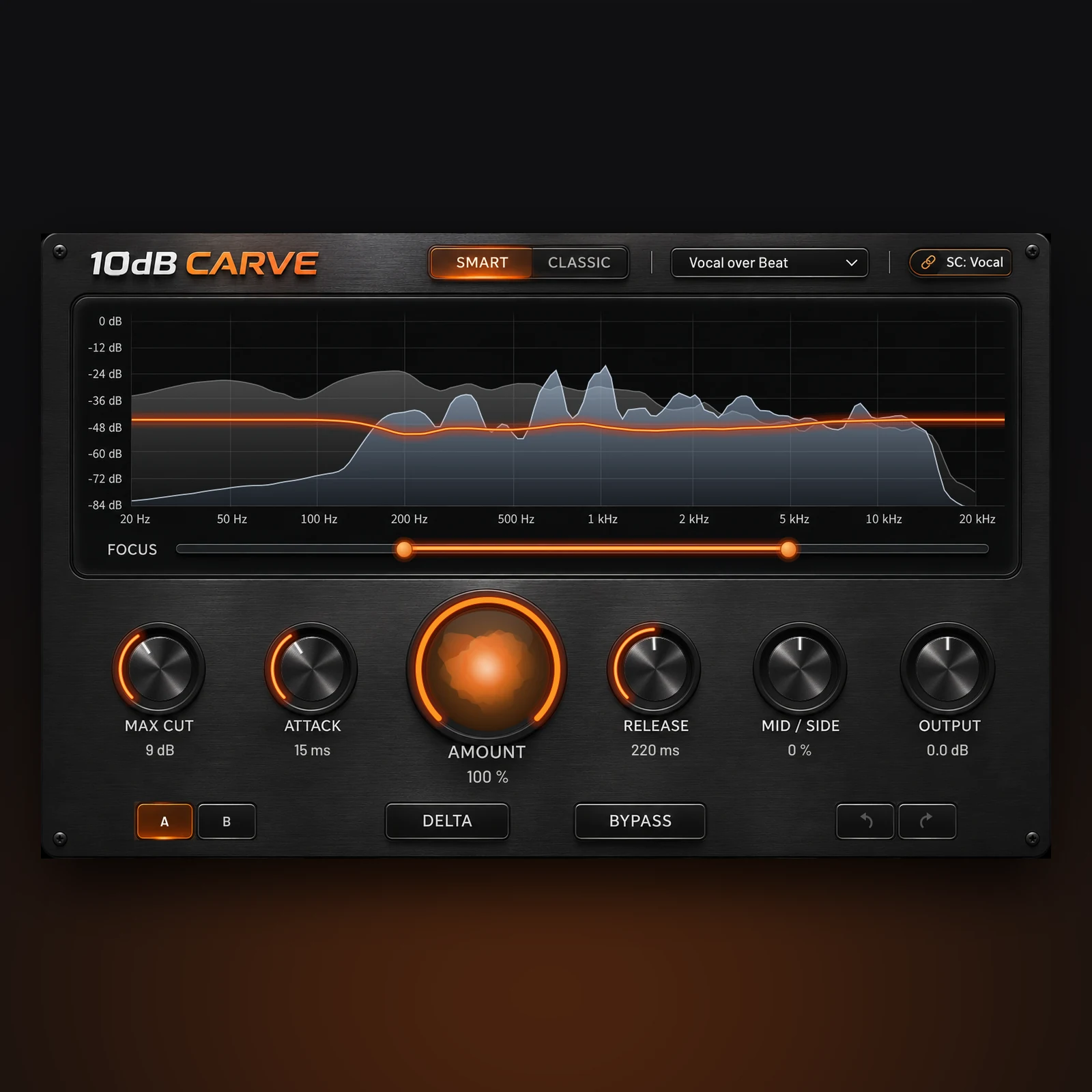
- Clarity Orb, live spectrum and cut curve show exactly what is happening
- FOCUS range, Mid/Side, sidechain filters, DELTA listen, A/B and undo
- Low latency mode (about 11 ms) for recording, plus 6 factory presets
- VST3 for Windows and Mac, AU for Logic Pro (Apple Silicon and Intel)
$19 $49
10dB CARVE is a spectral ducking plugin that makes room for a vocal (or any lead sound) inside a busy track. Put it on the beat, send the vocal to its sidechain input, and CARVE turns the beat down only in the frequencies where it covers the voice, and only while the voice is there. It is built for producers, beatmakers, songwriters, podcasters and mix engineers who want a clear vocal without pushing the fader up or carving fixed EQ notches by hand.
Why a spectral ducking plugin beats a sidechain compressor
A sidechain compressor turns the whole beat down every time the vocal comes in. You get space, but you also lose the kick, the bass and the air, and the track starts to pump. CARVE listens to the vocal in 32 frequency bands from 40 Hz to 16 kHz. If the voice sits at 2 kHz, only the part of the beat around 2 kHz gives way. The low end, the hats and everything the vocal does not need stay exactly where you mixed them.
SMART and CLASSIC modes
SMART works out, band by band, how much the beat is masking the vocal and cuts only enough for the vocal to sit about 3 dB on top. Where the vocal is far too quiet to ever poke through, it leaves that band alone instead of hollowing out the beat for nothing. The result is clarity you notice in the words, not in a beat that suddenly sounds smaller.
CLASSIC cuts wherever the vocal has energy, in proportion to how loud it is. It is the stronger, more obvious effect: useful for dense rock and EDM mixes, voice-over on loud music, or creative ducking.
See what it is doing
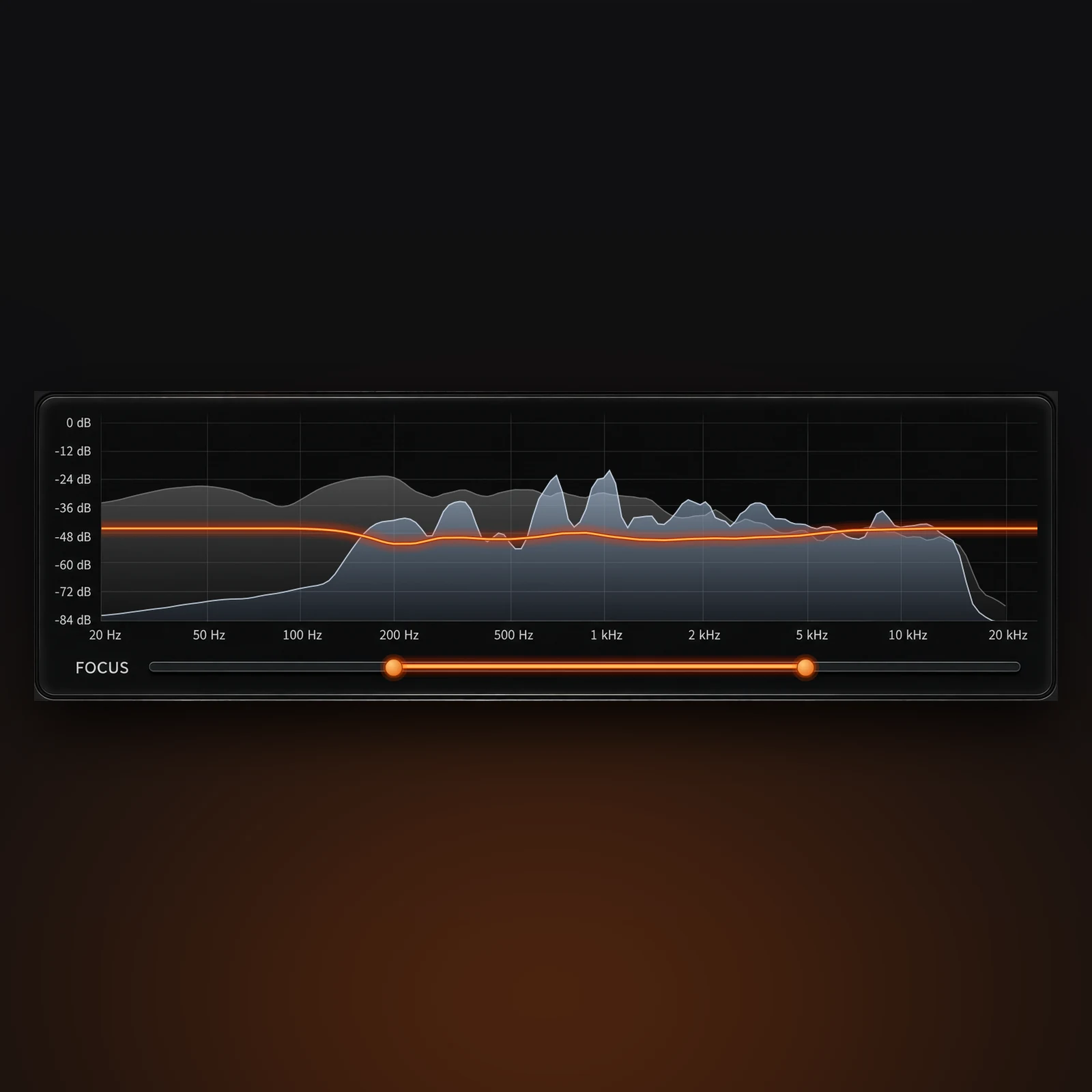
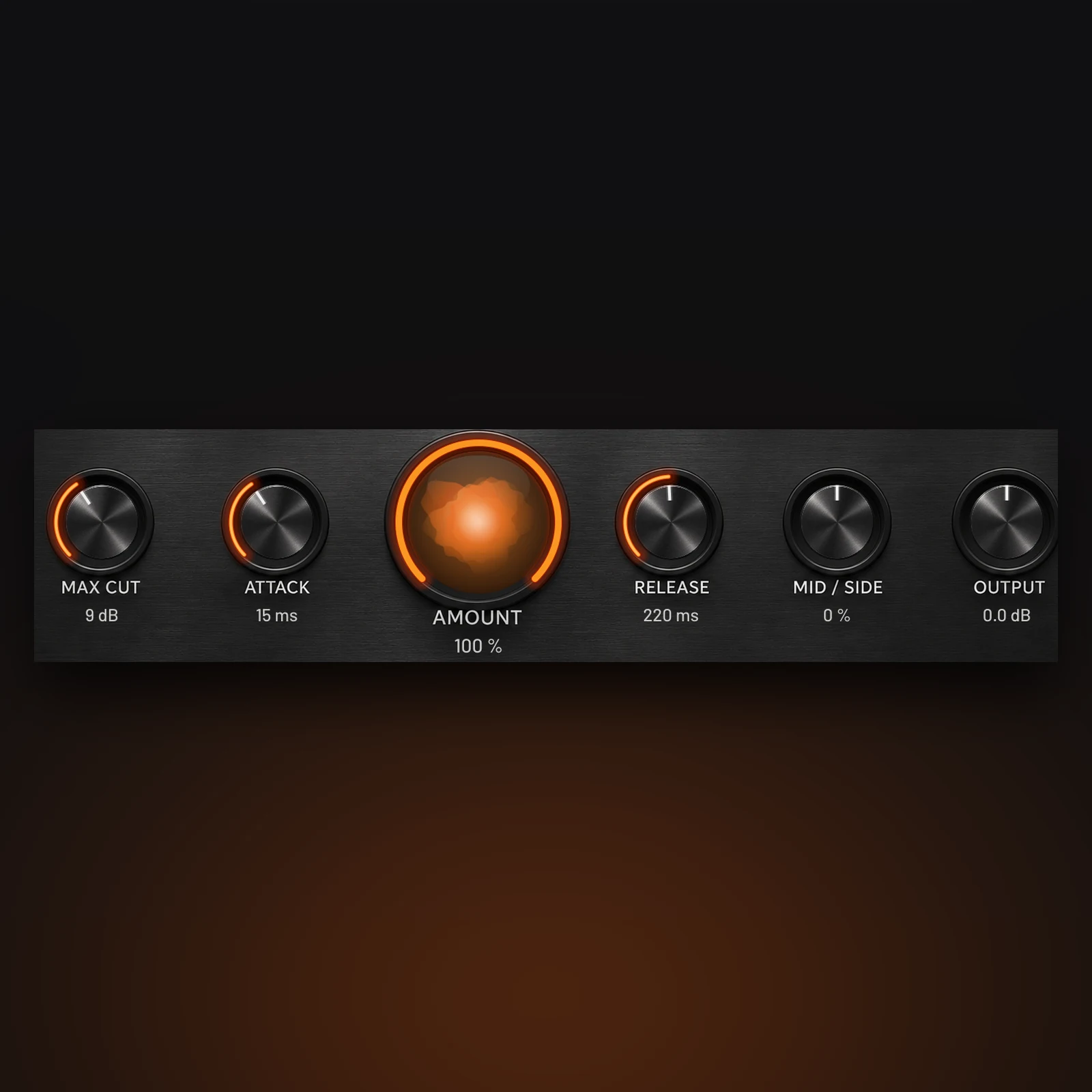
The display shows the vocal in blue, the beat in grey and the cut curve in orange, all moving in real time. Inside the AMOUNT control sits the Clarity Orb: it grows and glows orange with the amount of cut, pulses with the vocal, and shakes when the beat is still covering the voice, then settles as CARVE clears the space. Press DELTA to hear only what is being removed, a quick way to check you are not taking too much.
Controls that matter
- AMOUNT and MAX CUT (0 to 24 dB): how much of the cut is applied and the deepest cut allowed in any band.
- ATTACK (1 to 100 ms) and RELEASE (20 to 1000 ms): how fast the beat moves away and how smoothly it comes back.
- FOCUS: two handles set the frequency range CARVE may touch, so you can protect the kick and sub or the cymbals.
- MID / SIDE: cut only the centre of the beat, where a lead vocal usually sits, and keep its stereo width, or the reverse.
- Sidechain high-pass and low-pass: stop rumble, plosives or hiss in the vocal track from triggering cuts.
- OUTPUT (-12 to +12 dB), BYPASS with a smooth fade, A/B compare, undo/redo, factory and user presets.
Who is it for?
CARVE is for anyone whose vocal keeps disappearing behind the instrumental: rap and R&B vocals over heavy beats, pop vocals over dense synths, a singer against loud guitars, or a podcast voice over a music bed. The Kick over Bass preset also uses it the other way round, letting the bass step aside for the kick. It is not a replacement for a good arrangement or for EQ on the vocal itself, and it needs a DAW that supports sidechain routing.
How to set it up
- Insert CARVE on the track that should make room (the beat, the music bus or the guitars).
- Send the vocal track to CARVE’s sidechain input. In Logic Pro, pick the vocal in the Side Chain menu at the top of the plugin window. In REAPER, send the vocal to channels 3/4 of the beat track. In Cubase, activate the plugin’s sidechain button and send the vocal to it.
- When the vocal arrives, the SC: Vocal light turns on and the blue spectrum appears. If nothing reaches the sidechain, CARVE shows a message and leaves the audio untouched.
- Start with the Vocal over Beat preset and switch BYPASS on and off while the chorus plays.
10dB CARVE compared with other options
A sidechain compressor ducks the whole signal and is simpler, but it pumps and dulls the beat. A dynamic EQ with sidechain can do a similar job on a few bands you choose by hand. Wavesfactory Trackspacer is the long-standing tool in this category, also with 32 bands, and adds AAX for Pro Tools, which CARVE does not have. CARVE’s own strengths are the SMART mode that cuts only what is needed, the Clarity Orb and delta listening, a low latency mode for tracking, and A/B plus undo built in.
Sound quality and latency
CARVE applies its cut as a minimum-phase filter, the way an analogue EQ behaves, so drum hits stay clean with no pre-echo in front of them. Latency is 43 ms at 48 kHz in Normal mode and about 11 ms in Low mode; both are reported to your DAW, which compensates automatically. Sample rates from 44.1 to 96 kHz, mono and stereo tracks are supported.
Key Features
- 32-band spectral ducking driven by an external sidechain
- SMART (masking-aware) and CLASSIC modes
- Live vocal and beat spectrum with cut curve, plus the animated Clarity Orb
- FOCUS frequency range, Mid/Side control, sidechain HPF and LPF
- DELTA listen, smooth BYPASS, A/B compare, undo/redo
- 6 factory presets and unlimited user presets
- Normal (43 ms) and Low (11 ms) latency modes
- Resizable interface, VST3 and AU, Apple Silicon and Intel
FAQ
Why don’t I hear any difference?
CARVE only works when the vocal reaches its sidechain input. Check that the SC: Vocal light is on and the blue spectrum is moving. Without a sidechain signal it deliberately leaves the beat untouched.
Should I use SMART or CLASSIC?
Start with SMART for vocals: it keeps the beat full and only clears what is masking the words. Switch to CLASSIC when you want a stronger, more obvious pocket.
Does it work in Pro Tools?
No. CARVE comes as VST3 and AU, so it works in hosts such as Logic Pro, Ableton Live, Cubase, Studio One, FL Studio, Bitwig and REAPER, but not in Pro Tools, which needs AAX.
Can I use it while recording?
Yes. Click SC: Vocal and choose Latency > Low for about 11 ms. Normal mode gives the finest frequency detail and is the better choice for mixing.
Mac says the plugin “can’t be verified”. What do I do?
Open the installer, and if macOS blocks it go to System Settings > Privacy & Security and click Open Anyway, then run the installer again. On macOS 14 and earlier you can also right-click the installer and choose Open.
Can it help the kick and bass?
Yes. Put CARVE on the bass, send the kick to the sidechain and load the Kick over Bass preset, which focuses on 30 to 250 Hz with a fast attack.
Why buy from 10dB
10dB is an Australian online audio store, so you pay in Australian dollars with Stripe, PayPal, Afterpay, Zip or Google Pay, with no card surcharge. CARVE is made by 10dB, and you can reach us by phone or email between 10:00 and 18:00. Browse more VST plug-ins, or complete your setup with audio interfaces and studio monitors for mixing.
Specifications
| Specification | Details |
|---|---|
| Product type | Spectral ducking / sidechain EQ plugin |
| Developer | 10dB |
| Formats | VST3 (Windows and macOS), AU (macOS) |
| Pro Tools (AAX) | Not supported |
| macOS | 10.13 or later, universal (Apple Silicon and Intel) |
| Windows | 64-bit |
| Sidechain | External sidechain input, mono or stereo (DAW with sidechain support required) |
| Analysis bands | 32 bands, 40 Hz – 16 kHz |
| Modes | SMART, CLASSIC |
| Max cut | 0 – 24 dB |
| Attack | 1 – 100 ms |
| Release | 20 – 1000 ms |
| Mid / Side | Mid 100 % to Side 100 % |
| Output | -12 to +12 dB |
| Sidechain filters | HPF Off/80/120/200/300 Hz, LPF Off/16/12/8/5 kHz |
| Latency | Normal 2047 samples (43 ms at 48 kHz), Low 511 samples (11 ms at 48 kHz) |
| Sample rates | 44.1 – 96 kHz |
| Channels | Mono or stereo |
| Presets | 6 factory presets plus user presets |
| Interface | Resizable |
| Version | 1.0.0 |
Related products
-
Acoustic Treatment & Room Correction, Studio & Recording, VST Plug-Ins
IK Multimedia ARC X Room Correction Software with Measurement Mic
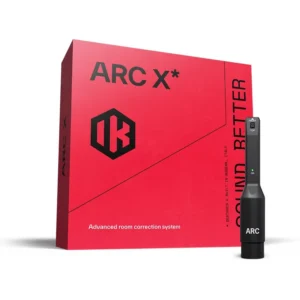 Acoustic Treatment & Room Correction, Studio & Recording, VST Plug-Ins
IK Multimedia ARC X Room Correction Software with Measurement Mic
- Measures your room and corrects frequency and phase problems at the listening position
- Flexible scans from a quick 1-point check to a detailed 21-point map
- Nine target curves plus Natural and Linear phase modes
- Virtual monitoring of 20+ reference monitors and playback systems
- Precision MEMS measurement microphone included
- AU, VST3 and AAX plug-in for Mac and Windows
SKU: IKMT_AC-X-HCD-IN